ISO 19650 project management, with AI
Know who owns what on every project, and prove it was delivered
Turn your documents and spreadsheets into one ISO 19650 plan, with an owner on every line.
Set your requirements once and see every appointed party's plan, agreed line by line.
Get every subcontractor's deliverables owned, agreed and signed in one ISO 19650 plan.
Agree who models what with every consultant, in one ISO 19650 plan.
Turn your method into templates and run every client's ISO 19650 plan from them.
Students learn ISO 19650 by doing it: free courses with certificates, then a real project.
Free plan, no card
Import Word, PDF, Excel, and more.


One visual plan
Every line owned and agreed
- ARArchitecture
- STStructure
- MEMEP
Models checked automatically
PassCheckFail
Charts that update themselves







CDE Connect keeps every system in sync
Trusted by nearly 150,000 teams in 100+ countries

























How Plannerly works
Turn everything you have into one plan where every line has an owner who agreed to it - then deliver, check and track it to the end.
1Plan
2Manage
3Track
4Control
Word
PDF
Excel
One visual plan
Every line owned and agreed
MarAprMay
ARCan Structure finish by Stage 3?
Yes - moved to Stage 3.ST
Agreements Scope ScheduleDelivery plan
Agreements Scope ScheduleSigned
CDE ConnectTwo-way sync
Tracked against the plan
- IFC Architectural model AR Pass
- IFC Structural model ST 2 to fix
- PDF MEP design report ME Pass
Weekly report sent to the team
Start with one job
Pick the job you're stuck on
Run the MIDP
Every deliverable defined, agreed by the team that owns it and tracked, without a spreadsheet to keep alive.
Free kitAgree the RACI
One accountable company per task, agreed by the people named in it, and evidenced when somebody asks.
Write the BEP
From the tender promise to the plan every team actually reads, with the responsibilities and delivery plan joined up.
TemplateSet the information requirements
OIR, AIR and EIR your supply chain can check their work against, not a PDF they skim once.
Check models with IDS
Every model checked against what you asked for, element by element, before you accept it.
VerifyStart the BEP from the EIR (AI can draft it)
Answer the client's requirements section by section, from the template or in your own words - AI can draft the first answers if you want. Then edit it and agree it.
AIScope LOD and LOIN at scale
The level of information need for every element and milestone on one visual grid, instead of a matrix nobody can read.
Connect your CDE
Bring files and model versions in from Autodesk, Procore, SharePoint and more, so delivery is tracked where the work lives.
Make it your company standard
Your best BEP, requirements and scope become templates, so every new project starts from your standard, not a blank page.
Docs, Scope, Verify and File Manager
One plan, four places to work on it
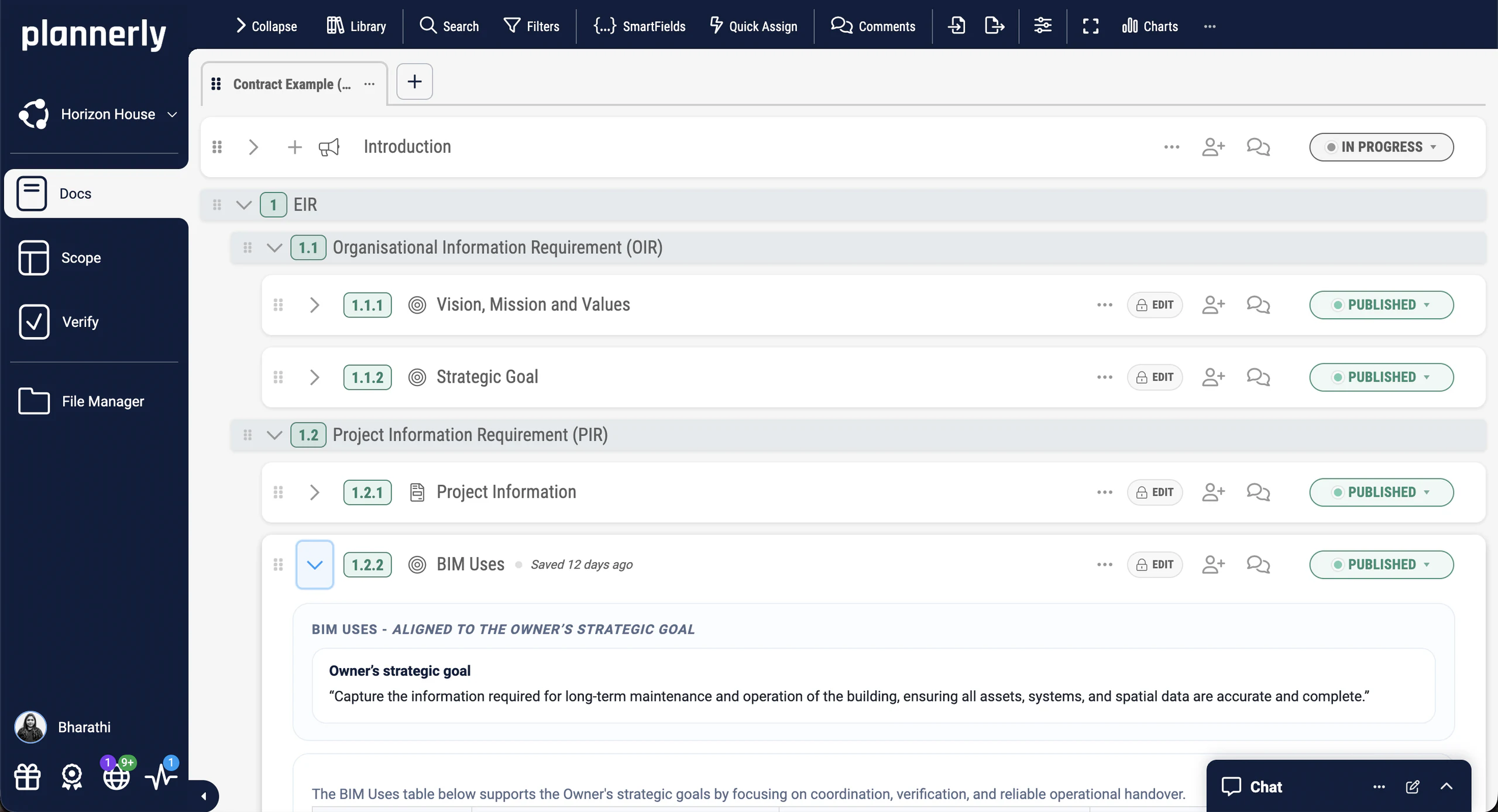
Docs
Smarter project documents
Write the EIR, BEP, protocols and meeting minutes as shared documents, starting from ISO 19650 templates. Write each section yourself or let AI draft a first version for you to edit. Every section keeps its owner and history, then goes out as a PDF or for e-signature.
- Templates for OIR, EIR, PIR, AIR, BEP and more
- Write it yourself, or let AI draft and improve the sections you choose
- Comments, version history and e-signature
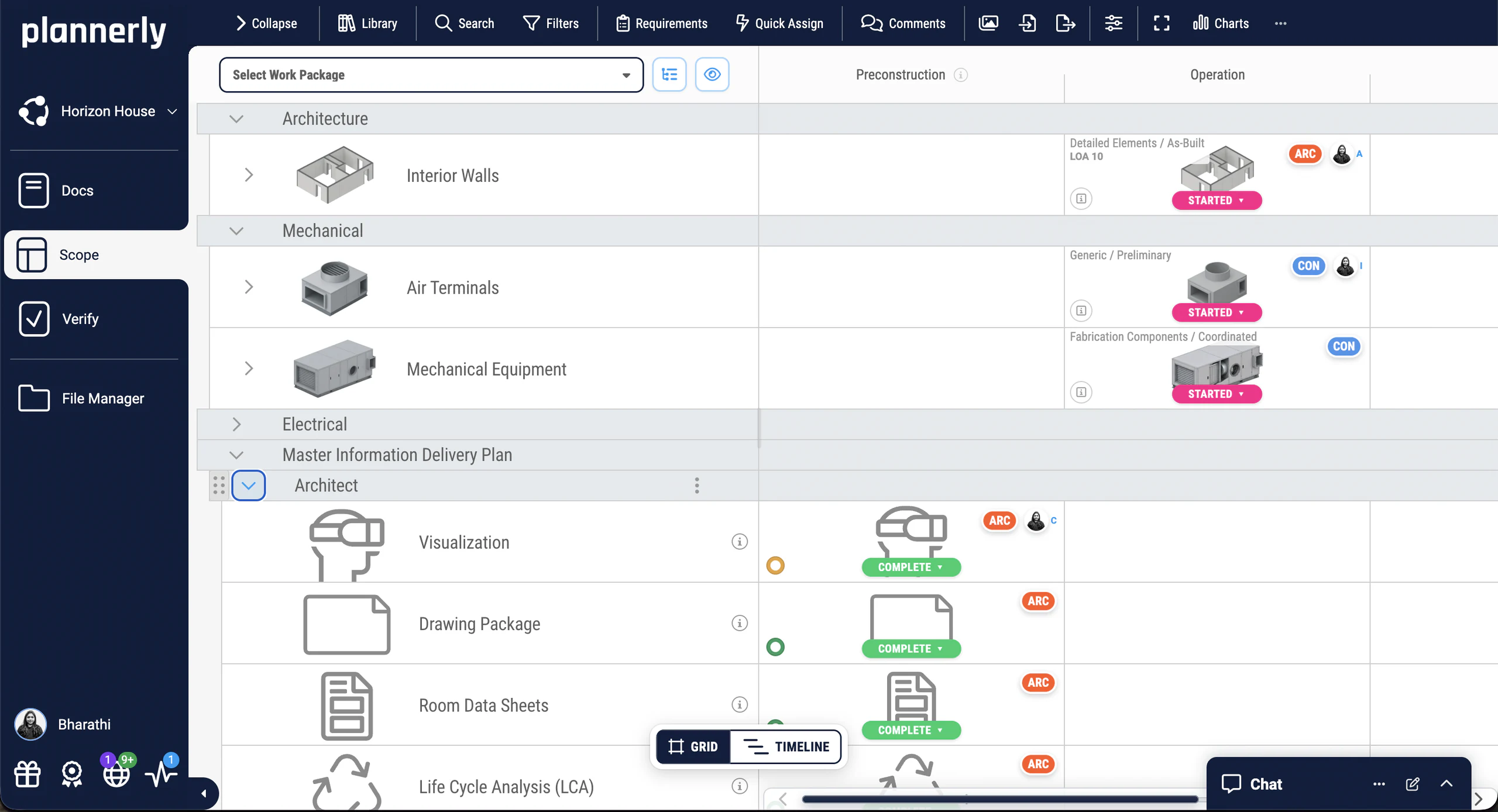
Scope
Simple visual scoping
Every element, deliverable and information requirement on one visual grid, by work package and milestone, from LOD to the ISO 19650 level of information need. Give each line one owner, and the same grid becomes the MIDP and every team's TIDP.
- AIA, BIM Forum and ISO 19650 frameworks
- Grid, timeline and Kanban views of the same plan
- Requirements from your library or the buildingSMART Data Dictionary
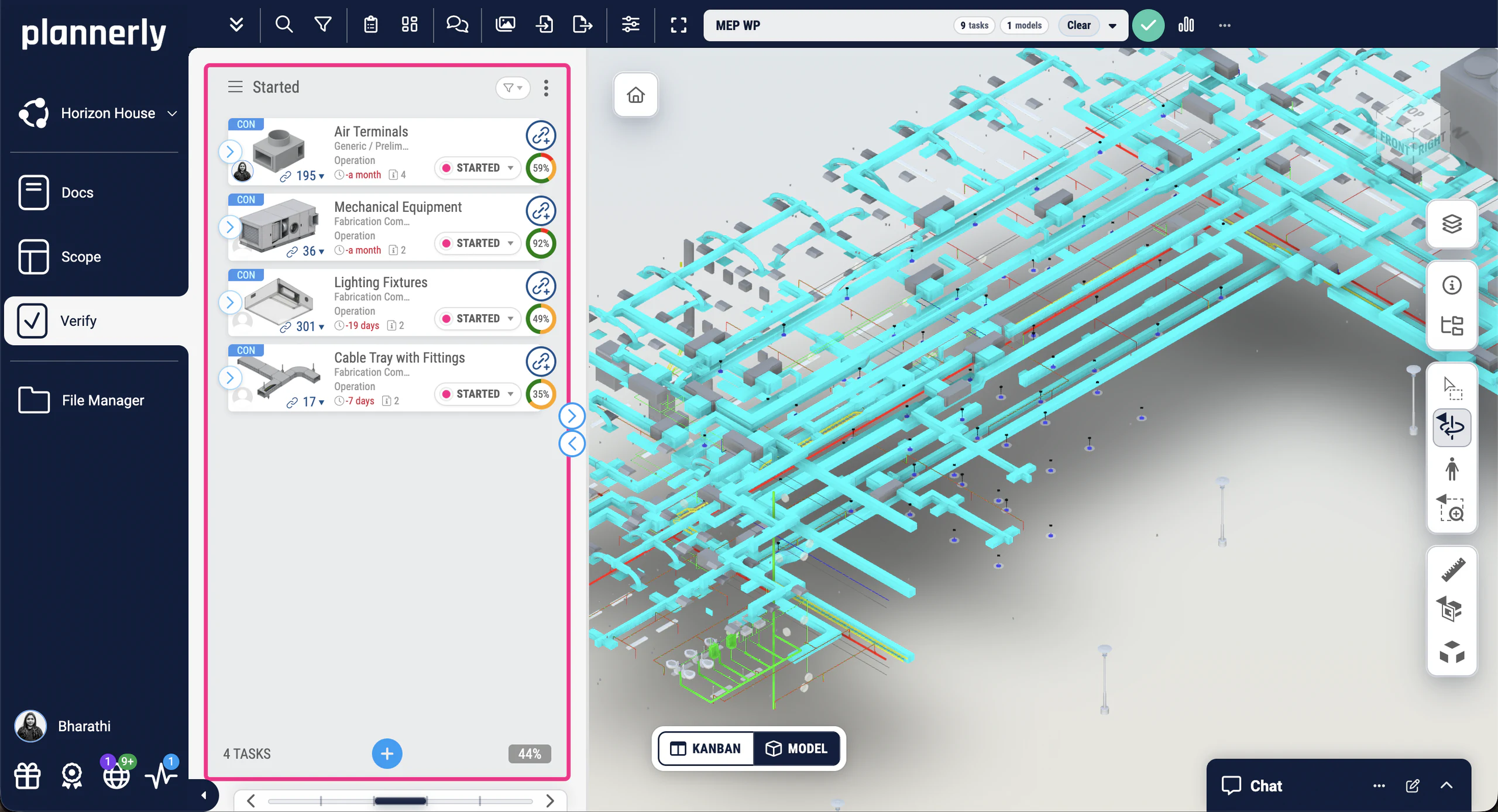
Verify
Automated BIM checking
Upload IFC, Revit and other models, or sync them from Autodesk Construction Cloud, and Plannerly checks every linked element against the requirements you set. Each team sees its own gaps, and the dashboards update as they fix them.
- Checks against your own requirements, which also export as IDS
- ACC and BIM 360 versions synced into Verify
- Live dashboards and scheduled PDF reports
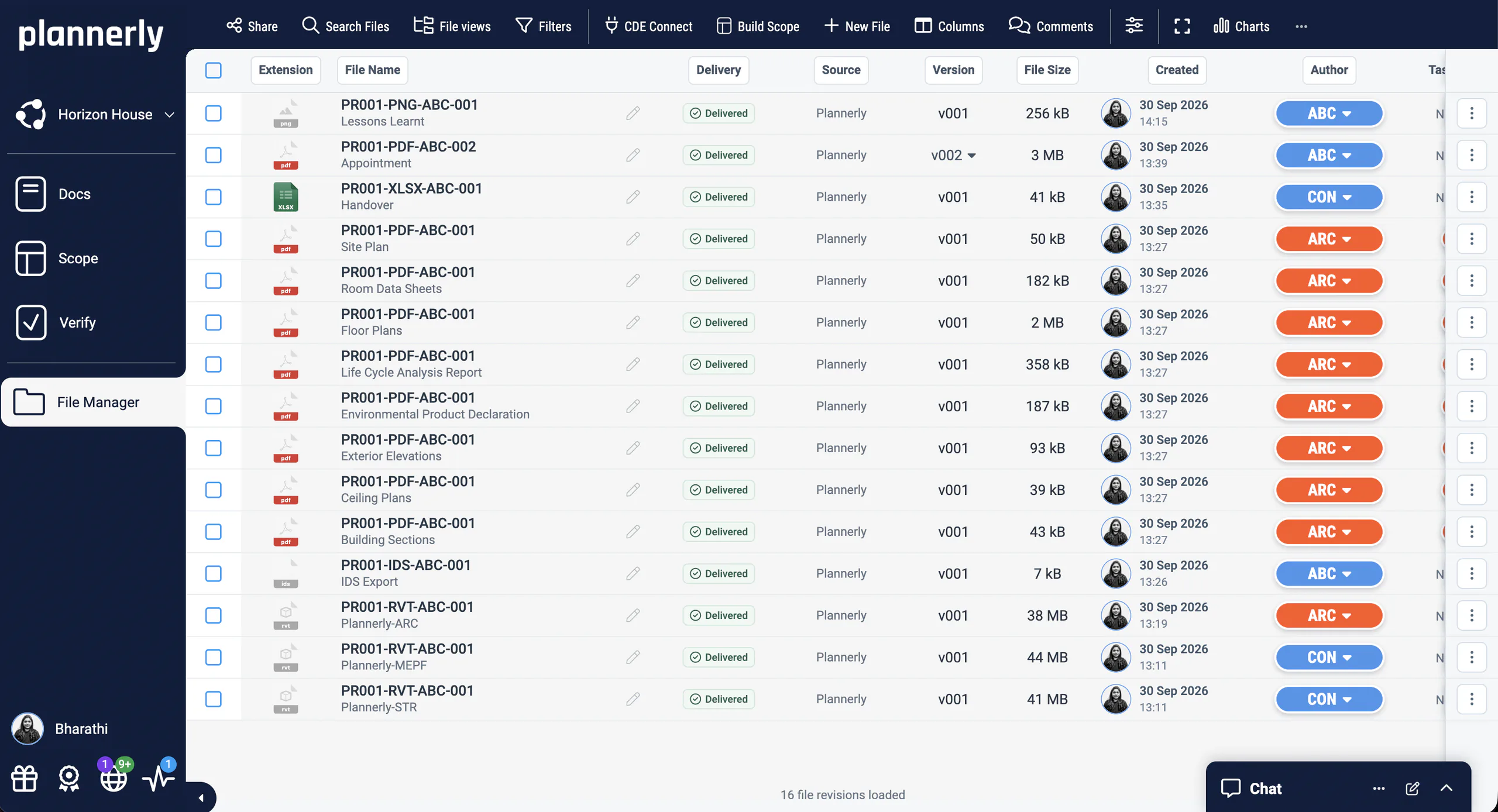
File Manager
A handover you can check, not just a folder
Bring the project's files together for review and acceptance, each with its source, version, size, date and author. CDE Connect syncs the folders you choose in Autodesk, Procore, SharePoint and more, so you hand over what the team actually shared.
- and more
AI in Plannerly
AI on your terms
Every job works without AI
Write, import, plan and check by hand whenever you prefer. AI is a shortcut you can take, never a step you have to.
You check what AI writes
Rewrites wait for your OK, imports show you a preview before anything is created, and what AI adds to a document stays in its history, so you can undo it.
Not used to train AI
Your projects, documents and files aren't used to train AI models - not by Plannerly, and not by the AI providers it uses.
Your data, in your region
On the Company plan, choose where your projects are stored: the EU, the US or Canada.
Security and data residencySwitch AI off for your company or a project
You'll be able to turn AI off for your whole company or for one project, so it only runs where you want it.
Coming soonHow AI works in Plannerly
What each AI feature does, what stays in your hands, and what's coming soon.
Proof
Teams like yours, with their own numbers
Owners, contractors, design teams, consultants and universities who stopped running ISO 19650 from spreadsheets - and measured what changed.
Owners who set the requirements once and checked every delivery against them, with the time and money they saved.
Contractors and developers who caught coordination problems months earlier, with the clashes and rework they avoided.
Design teams who grew without losing control of who models what, and kept every project to the same standard.
Consultancies who ran bigger projects with the same team, by turning their method into templates.
A university that made ISO 19650 certification part of the course, and the graduates it produced.
-

95% faster Model validation time
Read the story of JTC Corporation -

$4.5M / €4M Saved · 310,000 sqm project
Read the story of LIMSEN Consultants -
Major Real Estate Developer
53% fewer clashes $130M residential project
Read the story of Major Real Estate Developer -

80% time saving BIM & ESG verification
Read the story of MTECH Engineering -

8x growth 6 → 50+ engineers · −10% costs
Read the story of BuildEXT -

100% certified MSc student certification rate
Read the story of London South Bank University
See all case studiesOwners, design teams, contractors, consultants and educators - filter them by your kind of organisation.
Plannerly makes our conversations easier, it makes buy-in easier. It's a great basis of conversation and agreement.

Plannerly is both a tool and a process. It gives my teams an advantage over the competition.

Everyone was able to work from different countries in a collaborative way online.

Plannerly accelerated our standards creation and virtually eliminated the burden to get updates to end users.

Students love Plannerly and it makes my life so much easier!

What learners say
5-star feedback from busy teams
From students to BIM coordinators and project leads: what changed after the free courses.
5 out of 5
Having completed MSc in BIM & Management, I can tell from the experience that no one really explains about the ISO 19650 workflows but on this platform it is in much depth to clearly understand how the live projects are handled and Plannerly has everything in it.
Digvijay NaikArchitectural Technologist · Berks Insulation Ltd 5 out of 5
At the end of that certification, I felt like I had some confidence in me to go for this path.
Ece MülazımoğluBIM Coordinator · Scott Brownrigg 5 out of 5
I would say it's a one stop solution for multiple problems that current project teams are facing while project execution. I would definitely recommend this course to my fellow industry colleagues to get an in-depth, lucid understanding of ISO 19650 compliance ...
Sujay Ravi KaleBIM Engineer - Electrical · Mott MacDonald 5 out of 5
The course offered real, applicable insights that I’m already starting to put into practice. Appreciate the effort that’s gone into building something so relevant for the industry.
Shalini Devi UmachandranVDC Specialist · EllisDon 5 out of 5
Thank you to all of the Plannerly team for creating such a clear, practical, and easy-to-follow course on ISO 19650. It made everything finally make sense without the usual confusion.
Mina Nader 5 out of 5
Well delivered with practical examples and real project scenarios.
Philip O'ConnorICT Systems Mobilisation Lead · CIMIC Group Limited





Free certified training
Free BIM, ISO 19650 and Plannerly courses, with a certificate at every level
Self-paced and practical. Rated 4.90 from 7,230 learner ratings.
-

Level 1 · Free certificate
BIM Management Basics
Enhance your BIM Management awareness and boost your career potential.
-

Level 2 · Free certificate
Advanced BIM Workflows
Perfect your information management workflows and implementation skills.
-

Level 3 · Free certificate
ISO 19650 Expert
Master ISO 19650 compliance requirements and earn an expert certification.
-

For teams · Free checklist
ISO 19650 for Companies
Get an audit-proof ISO 19650 checklist and workflows for company-wide compliance.
-

Orientation · Free certificate
BIM Boot Camp
A practical, demo-packed orientation to BIM and ISO 19650 with real project examples.
-

Leadership · Free certificate
Digital Troublemaker
Step-by-step guidance to lead digital transformation with a clear action plan.
-

For project teams · Free certificate
Certified Plannerly Professional
Follow the project workflow and become a Certified Plannerly Professional.
-

For admins · Free certificate
Certified Plannerly Administrator
Set up your company's standards, access and connections, and become a Certified Plannerly Administrator.
-

The top level · Advisor-guided
Master Practitioner
Earn Plannerly's highest ISO 19650 credential through a practical, advisor-guided assignment.
Run your next project from the plan, not the inbox.
Start free, pick one job, and invite the teams who own it. You'll know who has agreed what by the end of the week.
Start free, set your requirements, and invite the appointed parties. You'll see whose plan is agreed by the end of the week.
Start free, load your deliverables, and invite your subcontractors. You'll know who has agreed what by the end of the week.
Start free, load the responsibility matrix, and invite your consultants. You'll know who models what by the end of the week.
Start free, turn your best BEP into a template, and start your next client project from it.
Start with the free courses, then ask us about education access for your programme.
Free plan · No card · Everyone you invite joins free